Since its explosive global debut, Wuthering Waves has kept players coming back with its breathtaking combat and open-world mysteries. But anyone who has tried to log in right after a new patch or during a limited banner rush knows the pain of a seemingly unresponsive server. A fast check can save minutes of staring at a loading screen. Here\u2019s how players can figure out if the game is down or if it\u2019s just a connection glitch in 2026.

The good news is that the method hasn\u2019t changed much over the years, even though Kuro Games keeps expanding its world. As of early 2026, there is still no dedicated official server status bot or real-time tracker from the developers themselves. That might sound a little old-school, but the community has turned it into a ritual\u2014almost a mini-game before the actual game begins. 🌪️
🧭 The First Stop: The In-Game Bulletin
Every seasoned Rover knows the login screen holds more than just the \u201cEnter\u201d button. Boot up Wuthering Waves and look for the \u201cBulletin\u201d option right on that screen. It\u2019s a clickable tab that lists the latest announcements, including scheduled maintenance, hotfixes, and server downtime windows.
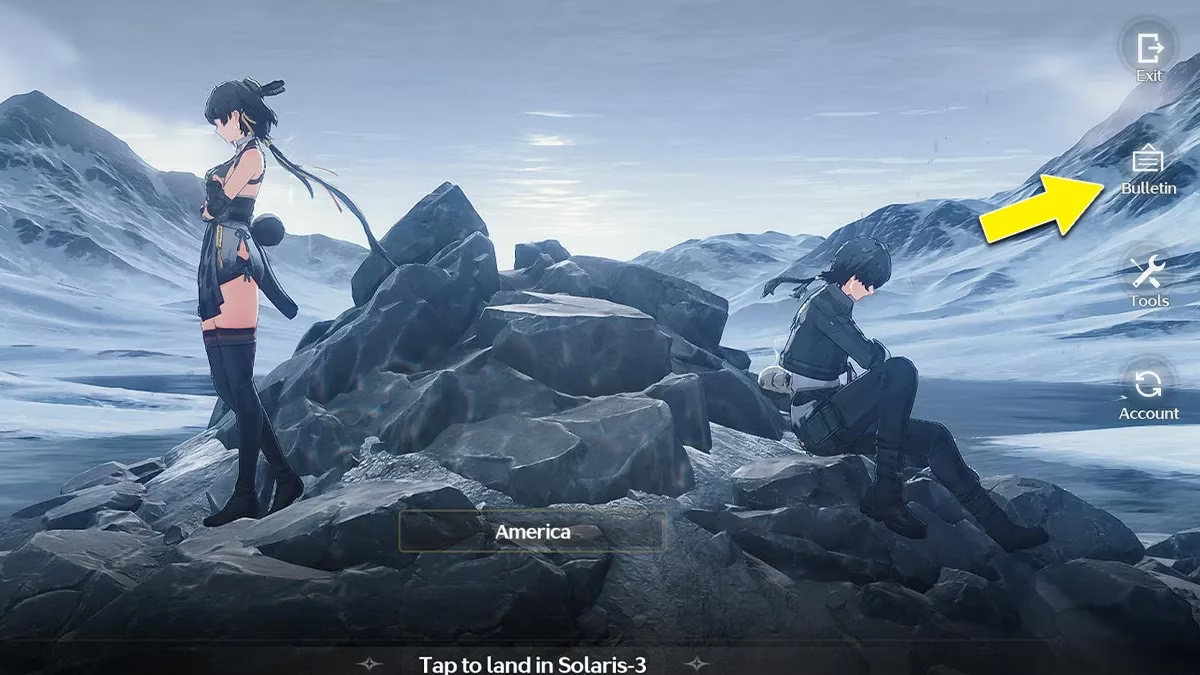
If an upcoming maintenance is planned\u2014say, for a new Resonator banner or a map expansion\u2014the Bulletin will show the exact times and affected servers. After tapping \u201clog in,\u201d if the game hangs on the connecting stage or throws a network error, that\u2019s the cue to double-check what the Bulletin said. A lot of players skip it, but this little corner is the most official info available. 🧾
📱 Cross-Check with Social Media and the Crowd
When the Bulletin doesn\u2019t explain a sudden outage, the next step is to open social media. The official Wuthering Waves Twitter (X) account and the game\u2019s regional social handles post real-time notices about emergency maintenance. Over the last two years, the team has gotten much faster at alerting players. Sometimes a server hiccup gets acknowledged within minutes.
Meanwhile, community platforms like Reddit, Discord, and YouTube streams light up the moment something goes wrong. Searching for \u201cWuthering Waves server down\u201d or checking a trending hashtag reveals if thousands of others are staring at the same frozen progress bar. If the complaints are flooding in from across the globe, it\u2019s definitely not a local Wi-Fi issue. 📢

⏰ Why Timing Matters in 2026
Server downtime in Wuthering Waves almost always aligns with the end of a limited banner or the arrival of a major version update. For instance, a popular limited Resonator banner closing on a Tuesday night usually brings a few hours of maintenance right after. The pattern in 2026 is predictable: big patches drop roughly every six weeks, and each one comes with a mandatory offline window.
Kuro Games now usually posts a full maintenance schedule on the Bulletin and social media at least 48 hours in advance. The notice includes when the servers go down (often in the early morning UTC) and an estimated finish time. Savvy players convert those to their own time zone so they can sneak in a session before work or school.
🚀 What to Do While You Wait
If the servers are genuinely offline for an update, there\u2019s not much to do except wait. But many players use that time to:
-
🌐 Refresh the official Wuthering Waves website for patch notes.
-
🎥 Watch content creators\u2019 early access videos revealing new mechanics.
-
💬 Hop into Discord to theory-craft party setups for the new Echo sets.
-
📖 Re-read the story summary so far\u2014the lore is dense, and a recap helps.
A small tip from veterans: never keep spamming the login button. That can sometimes cause login queues when the server comes back up. Instead, set a timer, grab a snack, and try again after 10 minutes. ⏲️
🔧 Third-Party Tools and Final Check
Although there isn\u2019t an official server status page, some third-party community sites have popped up in 2026 that monitor player reports and ping responses. These aren\u2019t endorsed by Kuro Games, but they can give a quick overview of which regions are affected. Players should still take them with a grain of salt and always confirm via the Bulletin or official channels.
If everything else fails, opening a different platform (e.g., switching from PC to mobile) can sometimes bypass authentication hiccups. A few Rovers swear that this trick works during localized ISP issues.
Wuthering Waves is still available on iOS, Android, PC, and now on cloud gaming platforms that have been added since launch. Each platform might recover at a slightly different pace, so switching devices occasionally does the magic. ✨
📢 Stay Calm and Rover On
Let\u2019s be honest: server downtime is never fun, but it\u2019s part of the live-service journey. The community has gotten really good at turning these moments into memes, watch parties, and lore debates. With the 2026 roadmaps promising even bigger multiplayer features, keeping an eye on server status will become second nature.
So next time the login screen seems stuck, just hit the Bulletin, glance at socials, and join the rest of the waiting Rovers. The server will be back before you know it, ready for the next adventure across Solaris-3. 🌅