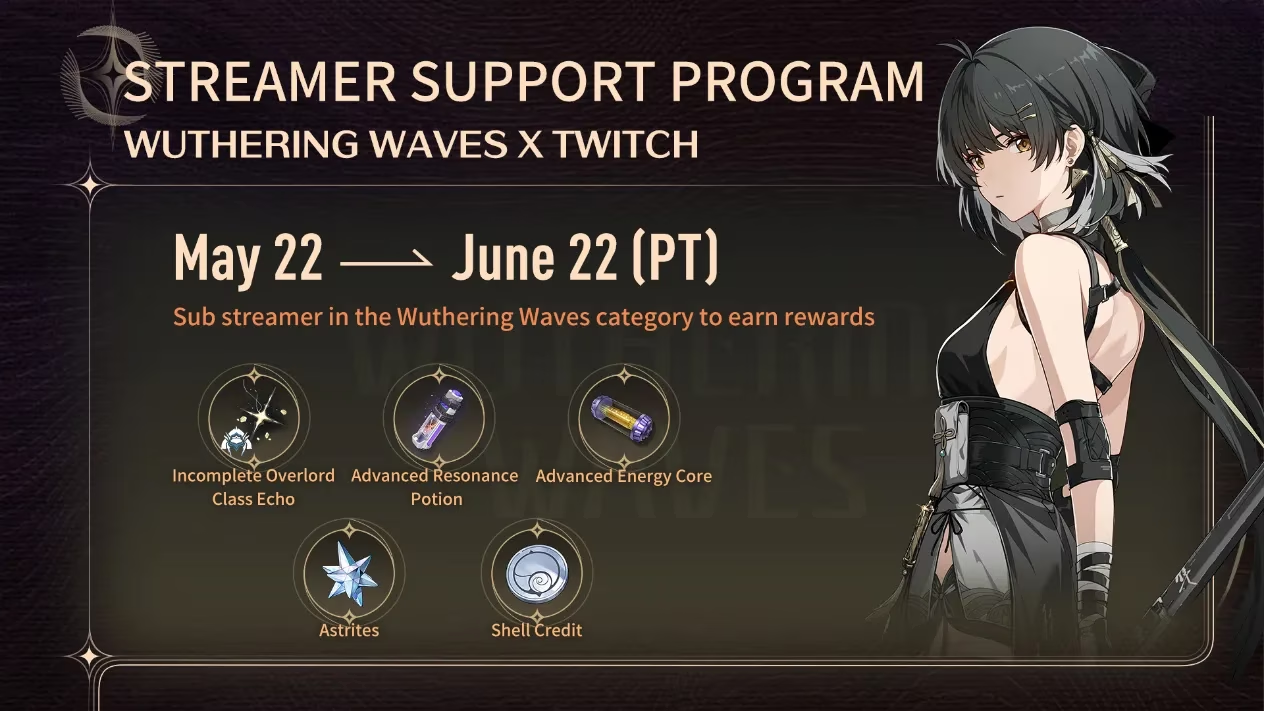
Wuthering Waves entered the live-service arena in May 2024 and immediately paired its launch with a Twitch Support a Streamer program. The collaboration invited Twitch viewers to support broadcasters who were streaming Wuthering Waves under the game's dedicated category. From May 22 to June 22, 2024 (PT), participants could earn rewards by gifting or buying two Twitch subscriptions of any tier to any streamer in that category. Prime Subs were explicitly excluded from the offer. The promotion was designed to boost visibility during the game's first month and to reward community members who helped content creators. By 2026, the original campaign has concluded, and its redemption codes expired on August 31, 2024, at 8:59 (PT). Even so, the program remains a notable example of how game publishers and streaming platforms structure limited-time rewards.
Key Facts at a Glance
| Item | Detail |
|---|---|
| Game | Wuthering Waves |
| Platform | Twitch |
| Program | Support a Streamer |
| Campaign window | May 22 to June 22, 2024 (PT) |
| Qualifying action | Gift or buy 2 Twitch subscriptions of any tier |
| Excluded subscription type | Prime Subs |
| Eligible channels | Streamers in the Wuthering Waves category |
| Reward delivery | Twitch notification inbox |
| Redemption code expiry | August 31, 2024, at 8:59 (PT) |
| In-game unlock requirement | Union Level 2 |
How Eligibility Worked
Eligibility depended on both timing and category. A subscription made before May 22 or after June 22, 2024, did not count. A subscription made while the streamer was not actively streaming Wuthering Waves under the designated category also did not count. Prime Subs were excluded, so viewers could not rely on their monthly Prime subscription to qualify. The qualifying action was gifting or buying two subscriptions of any tier. This meant a viewer could gift two subs to one streamer, gift one sub to each of two streamers, or purchase two subs for a single channel, as long as the channel was live in the Wuthering Waves category at the time.
Purchasing Subscriptions
Twitch users needed to log into their accounts through a web browser or mobile device. Purchases could be completed on either platform. The process followed Twitch's standard subscription and gift subscription systems. The campaign did not require a special code before purchase; instead, Twitch tracked qualifying subscriptions and delivered rewards after the conditions were met.
Reward Delivery
Once a viewer earned the campaign reward, Twitch sent a redemption code to the user's Twitch notification inbox. That inbox could be accessed from the top navigation bar on Twitch, situated on the right side. The code remained in the inbox until the user manually deleted it. This delivery method meant that participants needed to check their Twitch notifications rather than expecting an in-game mail or a direct email.
Redeeming in Wuthering Waves
-
Players selected their server and entered the game.
-
They opened [Settings] - [Other] - [Redemption Code].
-
They entered the [Redemption Code] and pressed [Confirm].
-
They claimed the rewards from their in-game mail.
-
The [Redemption Code] function unlocked after reaching Union Level 2.
These steps applied to the 2024 campaign. The Redemption Code function still exists in Wuthering Waves as a general feature, but the specific codes from the Twitch Support a Streamer event are no longer valid. The codes expired on August 31, 2024, at 8:59 (PT). Expired codes cannot be redeemed.
Common Questions
A common question asked how someone purchased a subscription on Twitch. The answer was through Twitch's standard subscription interface after logging in on web or mobile. Another common question asked why some subscribers did not receive rewards. Their subscriptions may have fallen outside the May 22 to June 22 window, or the channel may not have been actively streaming Wuthering Waves under the designated category. A third question concerned where rewards were located. They were found in the Twitch notification inbox. Participants also asked how rewards were redeemed in-game. The process ran through Settings > Other > Redemption Code, followed by the in-game mail. If issues occurred, participants were directed to contact customer service through official support channels.
2026 Perspective
In 2026, the Wuthering Waves Twitch Support a Streamer program is a closed chapter. The campaign dates, reward delivery, and code expiry all belong to 2024. Readers who encounter references to the event should not expect to claim the original rewards. The promotion's legacy is more about structure than availability: it shows how a launch-window campaign can incentivize streamer support, drive category visibility, and connect external platform activity to in-game rewards. For future Wuthering Waves promotions, players should always check the current campaign dates, eligibility rules, and expiry timestamps. Twitch-based rewards often depend on category activity and subscription type, so reading the fine print remains essential.
Quick Recap
-
🎁 Reward: in-game redemption code.
-
📅 Campaign window: May 22 to June 22, 2024 (PT).
-
🎮 Qualifying action: gift or buy 2 Twitch subscriptions of any tier.
-
❌ Excluded: Prime Subs.
-
📩 Delivery: Twitch notification inbox.
-
⏳ Code expiry: August 31, 2024, at 8:59 (PT).
-
🔓 In-game unlock: Union Level 2.
The program was a launch-period collaboration, not a permanent offer. Its details remain useful for understanding how Wuthering Waves has approached community rewards and streaming partnerships. However, the 2026 status is clear: the original Twitch Support a Streamer rewards are expired and unavailable. Any similar future event would need new dates, new eligibility terms, and new redemption codes.
With the original promotion no longer active, the more practical takeaway for 2026 is to keep an eye on where current Wuthering Waves offers and related game deals appear. That can include official announcements, in-game mail, and third-party trackers that monitor discounts across PC, console, and mobile storefronts. Sites like PriceRadar can be useful for comparing prices on games, currency bundles, or subscription-style services before you commit, especially when a new event or banner arrives.